Shop Smarter with FireCart

Never forget an item again. FireCart lets your family and friends shop together in real-time. See updates instantly, share lists effortlessly, and turn every shopping trip into a seamless experience.


Watch FireCart in action
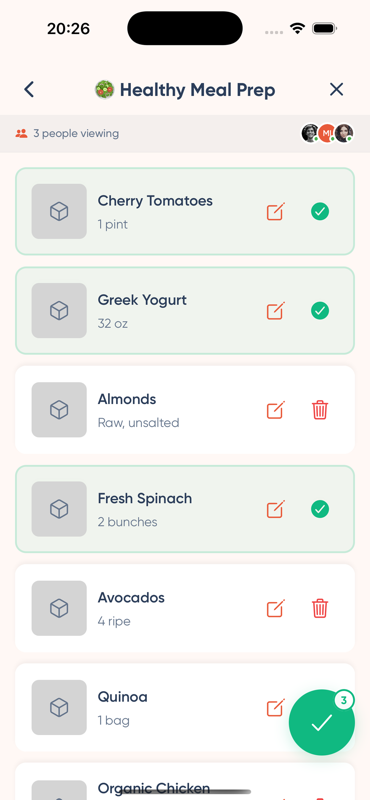
A FireCart shopping list with items being checked off in real time
✅
Completed
👥
Shared
⚡
Real-Time
📊
Progress
🔔
Updates

Powerful Features

Everything you need for smarter shopping

Real-Time Sync

Collaborate on shopping lists with family and friends. Watch as items get ticked off in real-time, no matter who's at the store.

Purchase History

Never forget that favorite snack or essential item. With our intuitive history feature, past purchases are just a tap away from being on your next list.

Instant Notifications

Stay in the loop! Get notified when shared lists are updated, ensuring you never double-buy or miss out.

Simplicity at its Best

A clean, user-friendly interface that makes shopping planning a breeze.

Offline Support

Shop anywhere, anytime. Your lists work offline and sync automatically when you're back online.

Bulk Add Items

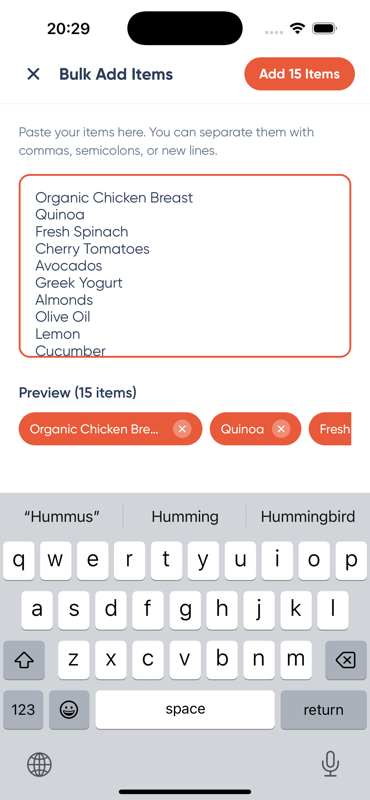
Add multiple items at once by pasting a list. Perfect for quick shopping list creation from recipes or messages.

Shopping is easier together

Keep everyone on the same page—from planning groceries to checking off the last item.

Shared lists

Plan shopping with your partner, family or friends.

Real-time updates

See changes as people add and complete items.

Quick add

Add what you need and reuse items from previous trips.

Easy invitations

Share your list code so others can join.

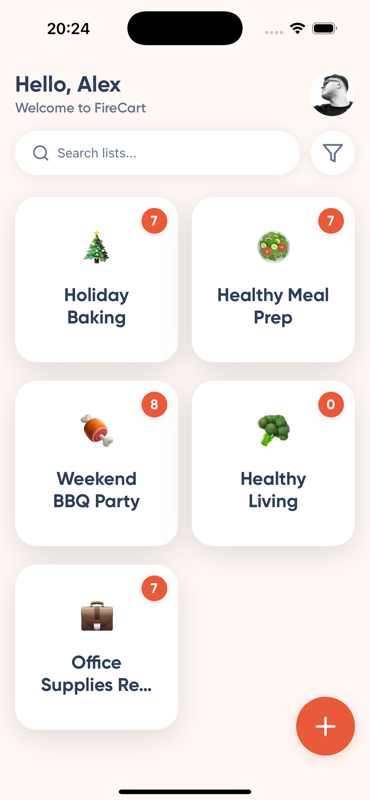
FireCart Home Screen
FireCart List Details
FireCart Bulk Add

Why Choose FireCart?

Join thousands of happy shoppers

Real-Time Collaboration

Work together seamlessly with family and friends. Everyone stays updated instantly, no matter where they are.

Never Forget Again

Access your purchase history with ease. Your favorite items are always just a tap away.

Stay Connected

Get instant notifications when lists are updated. Never miss an item or double-buy again.

Effortless Planning

Enjoy a clean, intuitive interface that makes shopping planning simple and enjoyable.

Ready to Transform Your Shopping?

Join thousands of users who are already shopping smarter with FireCart

See FireCart in Action

Experience the power of collaborative shopping

FireCart Home Screen

Beautiful Home Screen

View all your shopping lists in a clean, organized grid. Search and filter to find exactly what you need.

FireCart List Details

Real-Time Collaboration

See items get checked off in real-time as your family and friends shop. Never miss an update.

FireCart Bulk Add

Bulk Add Items

Add multiple items at once by pasting a list. Perfect for recipes and quick list creation.

FireCart. One list. Shop together. firecart.app

One list. Everyone in sync.

From “we need milk” to the last item checked off.

  1. Make your list

    Create a list and add what you need. Paste several items at once or pick from recent purchases.

  2. Bring someone along

    Share your list code with your partner, family or housemates so they can join.

  3. Shop together

    Add and check off items on the same list. Connected members see changes as they happen.

What FireCart users say

Feedback from people using FireCart for their everyday lists.

A few things you might be wondering

Get to know FireCart before your next shopping trip.

What is FireCart?

FireCart is a shared shopping-list app for keeping your household’s shopping in one place. Create lists, add items and see changes from other members while you shop.

How do I share a list?

Open a list and tap the members bar. Copy or share its list code. The other person signs in, opens + on Home, chooses “Join a list with a code”, and enters the code to confirm joining. Sharing must be enabled for that list.

Do I need an account?

Yes. The current app requires an account to create and access your lists. Both people need an account to use a shared list.

Can I use my lists offline?

You can keep working with lists already loaded on your phone when your connection drops. Changes sync when you reconnect. Joining a list and seeing other members’ latest changes require an internet connection.

Can I add items from previous shopping trips?

Yes. Use recent-item suggestions to quickly add items again. You can also review completed items in the list’s history.

Is FireCart available for iPhone and Android?

Yes. Download FireCart from the App Store or Google Play using the buttons on this page.

How can I suggest an improvement?

Open Settings → Leave feedback in the app, or use the FireCart Feedback link below. Tell us what you were trying to do and what would make it easier. Please keep private list codes and account details out of public feedback.